Friday, October 12, 2012

Google Forms--Fast to Make, Fast to Take, Fast to Tabulate!

Using Google Forms turned out to be a learning curve, as all our assignments have been, I wasn't fully expecting. Yet, one that will probably be the most far-reaching assignment for the research classes I teach in middle school. PRISMS [Problem Solving and Independent Study for Middle School] is a semester-long research class where the students must generate authentic data to prove, disprove, or add to what they have located about a topic of their own choosing. Some produce surveys, some interviews. All are carefully constructed along time-honored techniques any good survey- or interview writing uses. Google Forms, by it's user friendly capabilities bypasses many of the stumbling blocks common to producing a mature and worthwhile data-gathering tool: the introduction, types of questions, order of questions, the ebb and flow of the questions to hold the survey-takers attention.

Surveying opinions among the troops.
In the assignment, I prepared a PechaKucha 20x20 survey that would gather information from my Gifted Academic Program students about doing a PechaKucha activity. I'm not particularly looking for numbers as I am thoughts...the reasons behind actions. By gathering opinions on one Spreadsheet I can make quick comparisons. This online version of surveying opinion is fast to make, fast to take, and fast to tabulate. [OMG, that rhymes!!  How cool is that!] Quizzes would be much easier to produce and administer too for the same reasons that this survey was to produce.

Gourd Spiders
I tried to email the survey to my sister so she could serve as a test subject, and although she is in the Google system she could not access it -- even with permission from me to accept her. Making it public [sharing it] made the difference. So, it can be sent to others as a link in an email so it opens in another page (and showing the theme) or it can be sent embedded in the email so the person doesn't have to leave their email page to answer and send back.

School, gourd chapter, after-school activities - Forms have many used and may well be the reason this gourdhead chomps at the bit to make changes in how classes are run in the near future!

Sunday, October 7, 2012

Prezi

Teaching a research class to 6-8th grade gifted thinkers can be a lot of fun and allows me freedom to use irony and absurdity. Yet, even though gifted students can get concepts quickly and move on, they are still children and need to be taught. At the beginning of the semester, I teach question skills: the question formulation technique and Bloom's Taxonomy. Research is question driven and without these basic skills, their research efforts will be nothing more than producing a report or term paper. They need to understand what their thinking process is in order to proceed to original thinking. They know at any given time I will ask, "Where are you in Blooms?"

Wuertz Gourd Farm
In this assignment I explain Bloom's Taxonomy with the metaphor I use in class--cows. In keeping with the theme of this blog, it ends with a reference to gourds: a greeting at the Wuertz Gourd Farm of a cow sculpture wrapped in a Mexican serape with a snake gourd tied to its head and a sign that plays on the word gored. The kiddos will love it!!

Prezi is a presentation tool, related to a PowerPoint except that it is dynamic. It can incorporate PowerPoint slides, YouTube videos, pdfs, etc....it can be used online or offline, it can used as a collaboration tool between students, among teachers, across company teams. The editing tools are easy to navigate: the path moving from slide to slide can be changed easily, slides and images can be added or deleted, text added and subtracted. The basic level has limited capabilities but serves the purpose if the intent is to present information without the sophistication of different typefaces and backgrounds. But, as I said, the basic tools serve well. Movement is more interesting than a static image as the good folks at Cornell say.

Cow Gourd
The zooming aspect can be unnerving, especially when type is rotated from crazy angles to get it right-reading for viewing. Students in middle school will probably like it because it's soOOooo cool and Crah-AAzzYY!  Re-doing this for a teacher presentation, I would limit the 'whipping around' aspect a bit and approach the information more straightforward.

Many ISTE NETS-T standards are represented by this technique and assignment. First, #1--facilitating and inspiring student learning would be painless since I could begin a Bloom's lesson with Socratic questioning about the concepts of Bloom's, then show this as a model of walking through the 6 steps of learning before asking them to produce a Prezi example of walking through Bloom's.  This would naturally lead into standard #2 of designing and developing a relevant learning experience of not only Bloom's but of using a digital tool to express knowledge by the students building a Prezi of their own to show how a topic of their own can be applied to Bloom's. Standard #3 is modeling the process of a technology system to communicate information....their Prezis would go on to teach Bloom's to each other and perhaps other classes.

Thursday, October 4, 2012

Wednesday, October 3, 2012

Handwriting vs. Typing

A vital question: In the next generation, will the handwritten note look like marks on a page? This began this week's Diigo investigations. Many of my students, gifted academically and in many cases artistically, have handwriting I cannot read. There is a reluctance to change on their part and I am supposed to 'let me be me'.  Surely this cannot be right. Lately I have recognized that my own son (23 years old) prints all his correspondence, what little there is. Where did the cursive go? Where are the distinctive signatures of our forefathers?

The additions to my Diigo list, Brainy Stuff, indicate research exists explaining how different parts of the brain is engaged when writing and when typing. I still need to locate research that connects handwriting with giftedness, but the initial information is striking. This site shows a comic view of handwriting over time, and when a keyboard was introduced.

Cursive. Can technology reintroduce the skill?  Or will it be reduce to a quirky cool thing to do?


PhotoStory -- From Seed to Sell

PhotoStory is one of the programs we actually DO have in my school district...not that I ever did anything with it. However, this assignment introduced me to the possibilities of its use when communicating information to others. Whether in the classroom or on the lecture circuit when the Virginia Lovers' Gourd Society visits schools and garden clubs, it can be a companionable way to share information in one area while teaching or demonstrating in another.

I chose to produce a story about gourds [hold back your surprise!!], in fact it is a mini-introduction to novice gourdheads about moving through the year: planting the seed to selling the finished piece of art. By preparing the PowerPoint first, and following the rules of contrast, lean text, and some humor, I believe the slides presented an interesting series of visuals. While using PhotoStory, I could adjust the time allotment for each slide to mirror the PechaKucha 20x20 format...20 seconds for each of the 20 slides. By specifying transitions, I could also control slide emphasis as they moved forward in the presentation and faded into each other. Narration, thankfully!, could be redone repeatedly until the gasps and breathy tones left over from my cold could be controlled.

A quick download of YouTube gave me a place to put the final story, From Seed to Sell. This short video could only be made better with background gourd music by the Richmond Indigenous Gourd Orchestra...something not available to me at this time.

I discovered the value of YouTube and uploaded videos while doing this assignment and seeking help for the particulars of how to do parts of it--you know, for those details that make or break a project. Searching the YouTube tutorials gave me all the answers I needed to download, process, and upload. If there is a process, someone has made a YouTube tutorial and during late night hours when I'm getting crazy that is helpful indeed! It has been a clear demonstration about how a series of tutorials would be helpful in my classes where everyone is working on a different project. As I help one student personally with hands-on information, others who need more routine knowledge can access what they need independently...an illustration of ISTE NETS-T #3: communicating relevant information and ideas using digital media and formats. OR #2: designing relevant learning experiences...OR #1 of inspiring students learning using real world exploration.


Second thoughts: Here are the YouTubes I used to get the job done: this one in the Leave It to Beaver style and this one which was less glamorous but more specific.

Thursday, September 27, 2012

Powerful PowerPoint

This assignment was an interesting exercise in brevity and active surprise!  By scrutinizing the examples, considering the design elements of visual surprise, and trying to communicate vital bits of knowledge in a brief way, I believe I've put the power into my PowerPoint.

I am no stranger to developing presentations for large groups. One of my duties UNC-CH was to prepare PPts for the lawyers at the Institute of Government....back then PPts were the cutting edge of technology. Really. I'm that old. They had to be legal, detailed, with nothing left to the imagination. Thirty years later, preparing PPts for gifted research presentations, the level of detail does not have to be as expansive but sources are in-text cited and then included in a reference slide at the end to prove sources. The citing practice still continues when I prepare a presentation for professionals in the field...it is expected.


But with this assignment I needed to approach the information from a different perspective. I needed to display impact, directed to a specific audience for a specific purpose. I chose to prepare this PPt for giftedness as a guide for teachers who will have classrooms of heterogeneous populations but won't know what to do with gifted thinkers. Some teachers think giftedness is an elitist concept intended to give some students special favors.

Differentiation helps catches even those
not yet identified officially.
Some teachers are intimidated by students who may, in fact, know more than they do and resist differentiation where it may clearly be a valuable tool for those that are identified as gifted and especially for those not yet identified but who are in danger of losing interest and becoming an underachiever. [Underachievers are the gifted students who have been bored to tears by drilling the same information multiple times, or told to go slow so everyone can move together, or worse have teachers who believe differentiation means additional handouts about the same information the other students are learning.  **oUCH!!**  The gifted thinkers give up, they check out, and they appear lazy.]

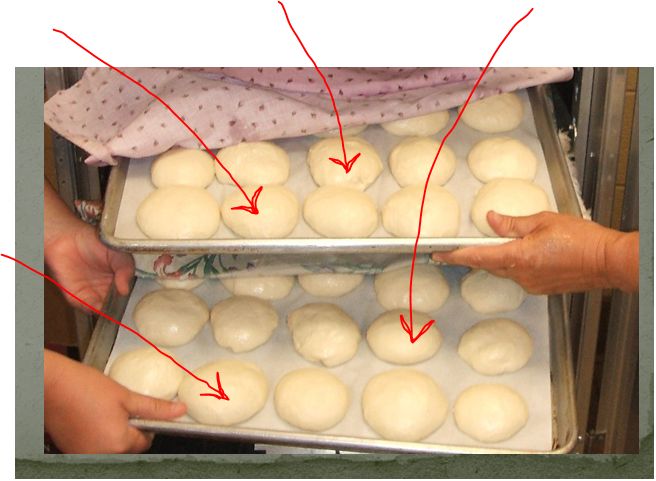
For this PowerPoint I followed a 'story' that begins with comparing thinking to bread making. It moves on to what a teacher can do to address individual needs in the classroom and then how to recognize gifted traits in a student who may need to be referred for evaluation. It ends with a tie back to the beginning bread metaphor. I initially wrote my story as if I were talking to someone, then repeatedly edited it for brevity until I had gone too far and it made no sense. A careful back step made the information meaningful, but brief. I used color, contrast, and humor where possible to portray meaning without words, or few words. It was a delicate dance back and forth to select the right words, the placement, and the color to express meaning. Ultimately I settled on what you saw and saved it to DropBox so it can be accessed later and through many different devices. This PPt could stand alone as an emailed attachment to teachers who have my students sprinkled in their rosters, or could be used as a faculty in-service where I would speak additional explanation and provide handouts.

This assignment, using a PowerPoint with teachers, clearly defines the fifth standard of the ISTE-NETS-S: engaging in professional growth and leadership, in particular contributing to the effectiveness and vitality of the teaching profession and of the school.

The purpose and audience needs to be clearly defined when preparing a PowerPoint. The images need to be memorable so the information lingers long after the last slide slips away.